
Prove compliance
Training matrix software
Replace the training matrix spreadsheet with a live matrix of who has completed what, by person, branch and department.
A training matrix answers one question: is everyone trained in what their role needs? In Elevate the matrix is built from real completion records, so it stays current without anyone updating a spreadsheet.
- View course status across employees, branches and departments in one matrix
- Choose the people, organisational details and courses each matrix covers
- Set required training and renewal periods per role
- Filter to what is outstanding and follow up the people who are behind
The problem this solves
Most training matrices are spreadsheets maintained by hand. They fall behind the moment someone completes a course, joins or changes role, and checking them before an inspection means rebuilding them first.
In practice
Moving a spreadsheet matrix into Elevate
Each role's required training and renewal period is set up once. From then on, the matrix updates as people complete training, and new starters pick up the right requirements automatically — the manager's job becomes following up the gaps, not maintaining the sheet.
What your people can do
- See their own required training and due dates in one list
- Complete outstanding training on a phone, tablet or computer
What managers and administrators can do
- View course status across employees, branches and departments in one matrix
- Choose the people, organisational details and courses each matrix covers
- Set required training and renewal periods per role
- Filter to what is outstanding and follow up the people who are behind
- Export the matrix for inspections, audits, clients and tenders
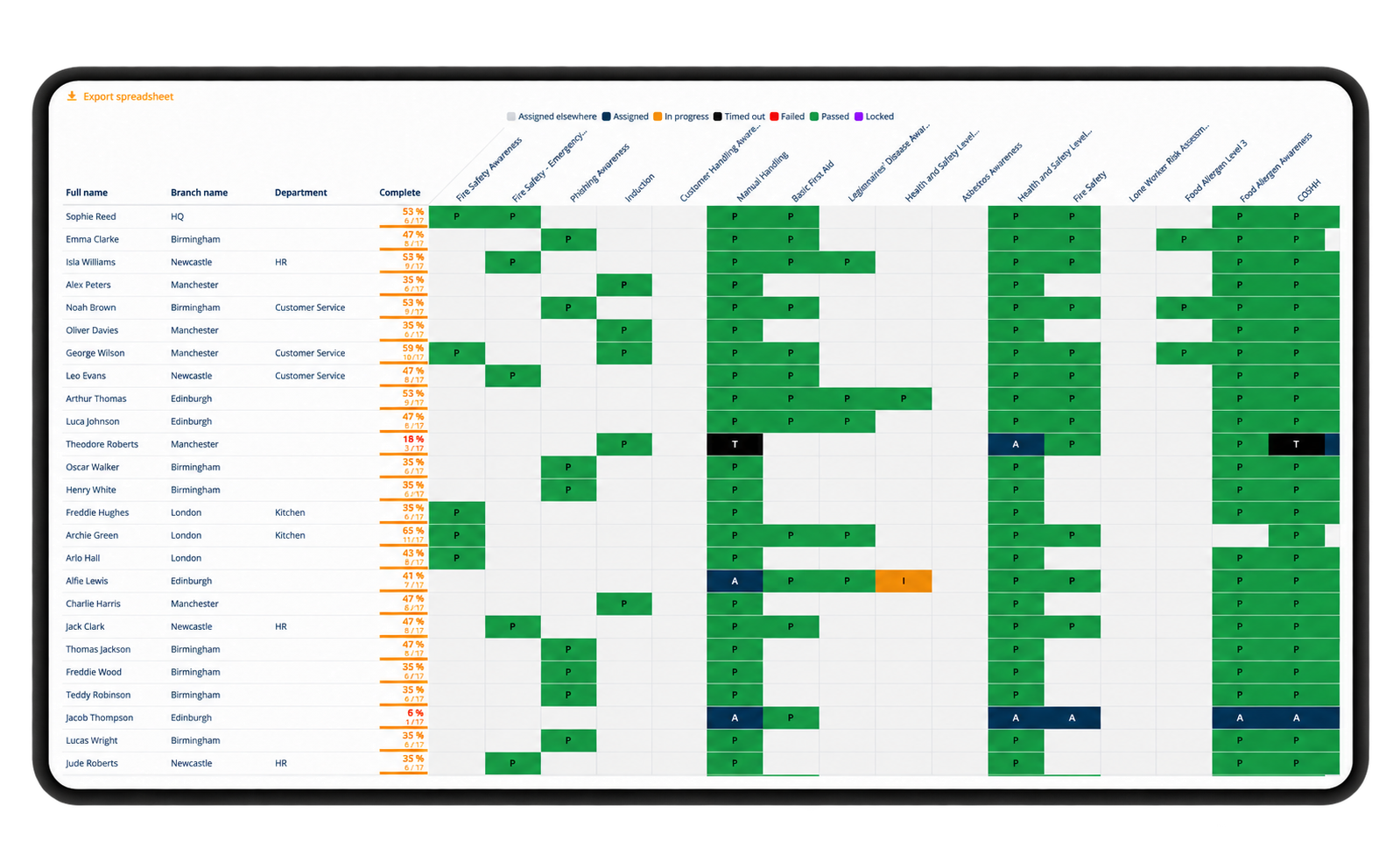
Every cell comes from a completion record, so the matrix shows the current position without anyone updating it.
Common questions
- Can we compare branches and departments?
- Yes. The matrix shows course status across employees, branches and departments, and can be filtered to the people and courses you choose.
- Can we export the training matrix?
- Yes, reports are exportable for audits, clients and tenders.
- Does the matrix include training done elsewhere?
- Externally awarded qualifications and certificates can be recorded so the picture is complete.
Also in prove compliance
Next step
See Elevate with your own sector in mind
A short, no-obligation walkthrough of the platform using examples relevant to your organisation. If it isn't a fit, we'll tell you.
- A live walkthrough, not a slide deck
- Questions answered by someone who knows the sector
- A written follow-up with what we discussed
- No obligation to go further